Suite à cette conférence, nous publions les vidéos et les slides des présentateurs et présentatrices qui nous ont fait l’honneur d’y présenter leur travail.
You need to have a HAM (Radio Amateur) license to transmit (yes, even a few milli-Watts (mW) or radiated power), but good news is that it’s the best time right now to pass your HAM license:
France has just changed its license test method so that bad answer don’t cost you points, and you can repeat (cram) exams so it’s not that difficult.
US has a much better and more progressive license scheme (Technician -> General -> Amateur Extra) and excellent teaching resources that makes it so much easier to get started.
… and you’ve got plenty of time to prepare for exams since you can’t get out due to this covid-19 lockdown 🙂
Now if you look at the picture above, there’s a little circuit between the RPi and the antenna… why is that?
On being clean…
Well, the RPi was never intended to directly output radio signal, so it generates a square wave with plenty of harmonics (unwanted frequencies above the desired generated radio frequencies) that pollute the spectrum if you connect the RPi output directly to the antenna.
NOTE: Having the privilege of sending radio waves worlwide comes with some small obligation: send clean radio signals! Don’t hurt your neighbour communications! Don’t force governments and regulators to limit our radio spectrum freedoms because we couldn’t self regulate. So far, HAM enthusiasts have done a great job not killing our radio passion. If you join, or plan on joining, please do the same.
Available Filters
So there are plenty of designs to make this output clean:
TAPR WSPR RPI Hats that work with their RPi OS image to transmit on various frequencies (20m wavelength (14 MHz): 14.070 MHz – 14.350 MHz for weak signal digital communications, 30m (10MHz): 10.130 – 10.150 MHz for weak signal digital communications, 40m (7MHz)).
Ok, if this looks like foreign unknown language, don’t worry, we’ll explain step by step.
DIY Filter
Now the goal of experimentation is to learn by yourself and make your own stuff, so below is the documentation of a design in progress (fun in progress? some people will call us crazy) of a custom filter, by non-electronicians, for the RPi. (You’ll see that we go slowly and step by step over the process we used, so that it’s easy to follow and reproduce).
The goal of this filter is to:
Learn about filters and electronic and RF,
work on 7 MHz,
for WSPR low signal (therefore low power, therefore we can maybe use some components such as Axial Fixed Inductors that are only for 0.25 W or 0.5W or 1W),
be built with low part number,
low complexity,
with easy to procure and to solder electronic components: no or low CMS, no exotic part numbers, no need to print a PCB mandatorily…
if possible no coil-winding (building the inductive coils),
if possible with protection of the RPi from static electricity coming from the antenna.
work on the RPi Zero W.
Actually, the goal of this post is to discuss between passionate individuals and critique the filter design(s) presented here, rather than providing a clean design.
So if you’re expecting a clean, profesionnal, working filter, this is maybe not the place.
Also, the goal is to document the (rather numerous) f..k-ups and mistakes we’ve done along the way, with their associated lessons-learned:
Using RC filter: originally selected because it is announced as the simplest filters, it worked but was extremely low-power output, due to to the very nature of Resistive-Capacitive (RC) filters, yeah, it resists and dissipates heat, therefore weakening to radio output power… logical.. Replace with Inductive Capacitive (LC) filter.
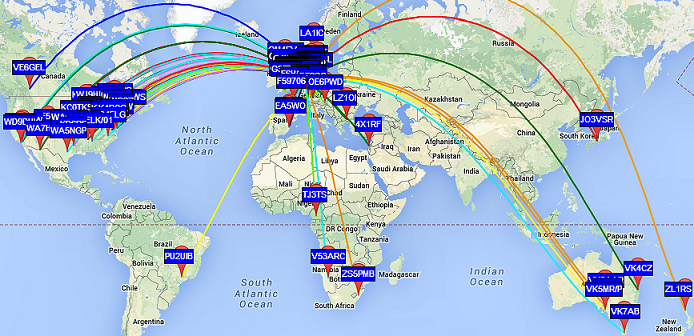
RPi can generate radio signals for a variety of bands, up to the FM band (around 100 MHz radio signal). This means that you have quite a lot of HAM bands (Legacy or WARC) you can use. The lower the HAM radio frequency, the bigger the antenna, the farther you can expect it to go: HF (3 MHz-30 MHz) can travel across oceans, VHF (30 MHz-300MHz) – UHF (300 MHz – 3000 MHz or 3GHz) range is only a few kilometers in usual conditions.
Usually antennas are one fourth or half the wavelength, so if you’re operating on 7 MHz, the 40 m band, you can expect your antenna to be from 10 meters to 20 meters wide, or high, or both.
That means that you usually choose your operating frequency based on the space you have. Typically, in cities, you will probably choose higher frequencies with smaller antennas.
And based on your antenna, you will pick a filter that is allowing only frequencies for this antenna to exit the RPi and go to the antenna.
Building an antenna is a lot of fun, and antennas are so varied, up to the ones that enable you to receive from and transmit to a satellite. It’s much easier than you initially think. We’ll have plenty of episodes related to antenna building.
So let’s build a filter… and please give us feedback
There are many types of filters, as stated earlier. We started with a RC filter but the drop in desired radio signal output power was too important, therefore prompting to choose another filter, an LC filter that should preserve better the desired radio signal power and still be somewhat simple to build with common components.
Of these LC filters, we choose a Butterworth pass-band filter, for its apparent simplicity. Critique is welcome.
Pass band means that only one range of frequency can go through. It’s opposed to Low-Pass Filters (LPF: Only frequency below the cut-off frequency can go through) or High-Pass Filters (only frequencies above the cut-off frequency can go through the filter).
$ brew tap guitorri/tap $ brew tap cartr/qt4 $ brew install qucs $ brew link qucs
Regarding installation on Linux, qucs was not in the APT packages of RPi. That’s because its Debian package was abandoned a few years ago. A lab member successfully compiled it using the official qucs wiki page on an AMD64 Debian 9 though, so there’s hope it might works on most distributions.
After this, we launch QUCS:
$ qucs &
First fun is that QUCS runs but isn’t launched in the foreground, you need to Alt-Tab or Command-Tab to select its icon to see its window (otherwise you spend a good amount of time saying “wow… must be super awesome large software that takes ages to start… really long… such 31337 software…”. actually QUCS is quite quick to launch!):
To see larger version of these screen shot, just right click on the image and select “Open image in new tab” and switch to that tab. Full size yeah!!!
Then you can (and should) create a new project by Clicking “New” in the “Projects” side tab (here already created as you already see filter_prj).
It corresponds actually to the folder ~/.qucs/<project_name> directory under which you’ll save all your schema files (*.sch). Creating the project directory will prevent some runtime errors when running simulations. Go ahead, create one and work there.
You can see above my quasi-OCD (Obsessive Compulsive Disorder) maniac naming style 😉
Then you go to Menu > Tools > Filter Synthesis:
Qucs Filter is then run, but same thing as QUCS run, also often stays in the background. You’ll have to press ALT-TAB or Command-Tab to change window focus to it.
We choose LC Ladder (PI Type). Why? No idea. Suggestions are welcome. (In reality we rummaged through many web pages and many QUCS choices, comparing resulting filters with the simplest designs that were shown on the Net, before settling on this choice). Suggestions (and rationale) are really welcome about this.
Then we change default type (Bessel) to Butterworth as it seems also to be a recommended LC type filter. (lessons learned not to use a RC filter and avoid signal power drops).
Then change default from Low Pass to Band Pass, and adapt start and stop frequencies, allowing for some “buffer space” around desired frequency.
Why this buffer space? because we’re going later to tweak values of electronic components to adjust with what we can easily buy, and therefore this will have an impact on the resulting frequencies that are allowed (that “pass”) or that are attenuated. Hence the choice to have some space around the 7 MHz HAM band frequencies.
The good thing is that the process described here works for all bands, you just need to adjust the values we’re specifying here. So if you want to build a filter for other frequencies, you can use this method and free software.
Here QUCS Filter with selected filters options and the frequencies input in MHz (note we changed the default frequency unit from GHz to MHz):
Then click “Calculate”
If you think nothing happens, well… you’re part right. It copied “something” (the result of filter computations) in the clipboard… then you need to switch to QUCS… and paste there in an empty circuit schema (Control-V or Command-V). A circuit skeleton will appear under your mouse cursor and hover on top of the schema for positioning of the filter result. That’s QUCS UX (User eXperience):
Move your mouse pointer to where you want your filter schema and click (Normal left click) to position it where you want on your page:
Tadaaa… the magic results appears on QUCS ! Argh… foreign unknown language again? We’ll explain later the schema.
But if you continue moving your mouse, you’ll see that a copy of the filter is still selected, appearing as a skeleton (and can again be applied):
Yes… this is troubling UX. Just press ESC to deselect it (or “forget” it), it’s ok, one copy is enough and it is already there on your schema.
You can go ahead and save this:
Please note that we choose to limit the amount of electronic components in the final circuit schema by selecting in the QUCS filter not “Order = 3” but to “Order = 2”:
so yeah, you’ll need to repeat the process of generating a filter… that’s training 😉
Resulting in this simplified schematics (with less electronic components):
Simpler isn’t it? — See, we have one less leg toward the ground with one less inductance “coils” and one less capacitor. Please also note that the remaining inductance and capacitor values have changed.
We don’t know really the impact of such choice, so don’t hesitate to tell us. It looked like the only visible impact (visible during simulation) was that the filtered signal would go closer to full values (1x the passed signal, 0x power of filtered values) with order=3, which means that our choice of order=2 means that the filtering nor the pass-through will be complete. That means that a small attenuation of the allowed band would still be applied by the circuit. It means also that the filtering would be less “selective” than and third-order circuit. It’s not so bad since at these very low power (RPi outputs only in the mW range), the attenuation of these very lower spurious signals is really sufficient and would not radiate enough to be a real RF interference to other radio spectrum users. Please tell us if we’re wrong!
As we understand this schema:
P1 (Port 1) is the generator, that is the TX output, the transmitter output:
Please note that it may be confusing as you see sometime “TX” label on some electronic schema for the input of the filter. It should be labeled “From TX” or “TX Output”.
P2 (Port 2) is the antenna (ANT).
It is also called sometime the “load” as you can output the radio signal to a resistive load to simulate an antenna (and avoid frying transmitters if they’re powerful enough and not connected to any “load”).
It’s very useful during design as it prevents badly designed filters from emitting real RF to an antenna.
Consider this when you start.
The antenna is really the output of the filter.
A little reminder on electronic components
Electronic components on a schema are prefixed by a letter that indicate the type of component, and then a number that indicates its identification on the schema and the value of such electronic component.
Let’s see common type of electronic components used here:
L: Inductors or Coils (“Bobines” or “Inductances” in french), these “store” energy as magnetic energy and give it back to the circuit.
There are many inductors types, most of the time these are coils of copper wire around a metallic ring “core”.
These are often used in transformers and amplifiers such as audio rigs, old power transformers, etc..
Some types are looking like resistors (one ceramic package traverse by a wire that is exposed on both sides)
C: Capacitors (“Condensateurs” in french), these “store” energy as electricity field energy and give it back to the circuit.
R: Resistors (“Resistances” in french), these pressure and limit the passage of electricity in a way that changes the Voltage (“E” in english, “U” in french) and Intensity (I).
There should be no specific resistor in filter circuits because resistors resists (!) and doing so, they heat up.
The heat is actually radio signal power that dissipates.
I.e.: the filter makes the whole radio signal power a bit weaker (or a lot weaker)
The look of resistors (one ceramic package traverse by a wire that is exposed on both sides) is very common. It’s often called the “through hole” packaging, since now there are surface mount (SMD) versions of it.
Let’s simulate now our new filter !
Now we have a filter, let’s see how it behaves in front of input frequencies. Nothing is better than a graph to “see” your filter. Here is how to generate this filter graph through simulation.
We click on Menu > Simulation > Simulate (or type F2):
A new screen appears… But nothing happens: no simulation result.
This is normal, QUCS is just waiting for you to chose which kind of simulation result you want to see. We’re going to chose Cartesian representation diagram, but the most elite radio guys will choose Smith (cuz it looks so cool! kidding aside, it must be awesome but it’s easier for newbies like us to read the simple graph):
Once you click on “Cartesian” and hover on the window, you see a “skeleton” of the result appear and follow you mouse. Just click (left click) once to instantiate the result, an option window should appear.
Now you need to set a few things for the simulation to run and result to appear.
First you need to say which signals you want to be graphed. Here what we understand is that S[1,2] is the filter output signal (i.e. the filtered signal). So we’re going to double click on S[1,2] to add it to the Graph:
But it’s not finished, we now need to restrict the Limits of the graph to only the portion of the simulation we’re interested in. So Click on Limits, Select Manual input for x-Axis:
The values we selected are in Hertz (Hz) and quite large around the band so that we clearly see the filter output, and the step (100,000) is to prevent cluttering the graph.
Then click “OK”. You’ll see a tiny graph appear.
You can drag the corners by clicking into the graph and select one corner to drag in order to enlarge the graph:
Then you have a nice result where you see in which frequencies your filter let’s the maximum of the signal go through:
We see that the band of frequencies specified is respected and let through by the filter, while the levels of other frequencies are very much attenuated. To read this diagram, the value on the Y-axis (on the left) is the number of times the power that goes through. The X-axis is the frequency. 7.1e6 corresponds to 7.1*1,000,000 Hz = 7.1 MHz
Now we need to adjust the components
As you’ll see, the values of components are not standardised values, and we need to change some of the components values to match what we can find in shops.
So we’ll do one change, save, run a simulation and check that the effect on the filter is not so bad. Not so bad effect means:
The filter still filters approximatively the same frequencies (same cut-offs)
The filtering level is still the same (around 0.1x of the signal or better)
The allowed (passed) signals are still around the same levels (0.9 or better)
So the raw values we had without adjustment of electronic components were:
Here is the adjusted graph we end up with:
All these values of components we can find in shops, except the L1 inductor that we can’t find. Suggestions welcome.
And the corresponding filter simulation output:
This looks acceptable. Or so we think… 😉
Now this is probably not how we should be building filters. And we’re open to suggestions or links to good resource to learn how to do better. It’s for sure not the Electronic Engineer’s way and we’re eager to do better.
Protect the RPi: Schottky Diode
We heard (and felt with our fingers) that antenna can collect some static electricity, and that we may need to protect the RPi against such electricity using a Schottky Diode. Although not classified as Schottky Diode, the 1N4148 signal diode was often quoted as the way to go to protect our RPi. So here we go and added to the schema:
Then we proceed to simulate again to check the resulting graph:
(Even though some error window is displayed before showing Simulation result graph)
We see that the filter’s output seems ok.
Now that’s where we are for now. The schematics are here.
Update for off-the-shelf capacitor values
For completeness, here is the v7 with the split C1 capacitor to reflect reality of capacitors values that are easily available in shops:
Here we see that C1 became C1 and C3 (in parallel) to add their values. C1 and C3 (and C2) are standard ceramic capacitors (through hole versions).
And the resulting simulations gives the same result:
Feedbacks and comments
We’re eager to hear more from you if you have any question or feedback. Please either come to /tmp/lab Matrix chat room: #tmplab:matrix.fuz.re or comment on the reddit link (that will be posted in some time). We also expect to make a short video too to show people how we use QUCS for this.
Next episodes:
Building the filter: soldering, components, testing
Antenna connections and measurements with NanoVNA
Setting up antennas, safety considerations, emitted power
Building our next antenna(s)
Testing the reach of WSPR weak signals
In the meantime, kind regards and please, come and participate. There are no stupid questions. There are no bad feedbacks (but please be kind 😉 ).
Feedbacks and discussion
Ah… that’s awesome, the power of internet community, already just a few minutes after publishing some kind souls gave comments about the design and very informative resources, so I’ll take them point by point here.
Feedback #1: LPF
I would have used a low pass filter, not bandpass.
Yes, we tried some LPF (Low Pass Filter) designs and failed at getting a nice output (the cut-off was very slow and the levels not great). What kind of LPF would be best for this application? (as indeed it sounds like a good candidate)
Here is a LPF design (along the lines of what the links below advised):
Two inductors, 3 capacitors. Here without optimized values for easy procurement.
And then the simulation results (here we use dBS11 and dBS21 data lines to plot relative power drop in dB. Have a look at this table to understand the relationship between dB and power multiplier. To remember easily, +3dB is double the power, -3 dB is half the power. +6dB is 4 times the power, etc..):
What I subjectively find is that the cutoff frequency isn’t very “sharp” in simulation (supposedly it’s sharper in reality), and with the same amount of electronic components as a Band Pass Filter (BPF). Not sure what the benefit of the LPF would be.
What do you see if you model your filter at 2x and 3x the working frequency?
Here is the simulation result of our BPF (Butterworth Band Pass Filter) with very wide band, not sure that’s what was asked:
No bad effect in simulation… but that’s only a sim of course. Reality sometime differs wildly!
Feedback #2: Diode as harmonics source 🙁
Also not sure you should have the diode protection. Diodes cause harmonics so as quickly as you try to filter them you have placed a device to create more 🙁
Hmm…. how to test for this? Would the simulation show such harmonics Indeed it will be easy to test in reality.
It’s easy to add or take off anyway in the resulting circuit.
Maybe take standard values for low pass filters from webpages like http://www.gqrp.com/technical2.htm then change the inductance values to the nearest standard value fixed components?
3 inductors and 5 capacitors is definitely a doable and simple enough filter circuit, even if a little bit more complex than our DIY design, but in all probability more reliable and clean. The Capacitor symbol seems to indicate that it’s polarized capacitors that are used. Any feedback how important it is to use polarized capacitors here?
The band table values for components gives also the commercially available component values:
Also some nice ARRL article about the CWAZ filters mentioned in the above resources.
Reading about these filters the CWAZ filters advised by GQRP seems to be advised because of the inadequate filtering of Chebyshev LPF when power levels greater than 5W (FCC requires transmitter spurious outputs below 30 MHz to be attenuated by 40 dB or more for power levels above 5W)
In our case, the power levels are far less than 5W, so actually we could maybe use a simple Chebyshev 3rd order Low Pass Filter and that could be good enough. The filter synthesis result of such LPF could be as simple as:
With resulting filter simulation:
Now when we adjust to available component values, this gives:
lc-ladder-pi-chebyshev-lpf-3rd-order-8MHz-v3.sch
How simple, 2x capacitor of 1nF, 1 inductor of 1uH. Now we’ll see if this fairy tale matches the reality of what we need once implemented 😉
It simulates to:
Which seems pretty much acceptable. Do you think the same? Tell us.
Feedback #4: Filter may not filter enough at higher frequencies
The filtering of our simple filters may not be enough: the roll-off, that is the drop after the cutoff frequency, may not be steep enough.
Filters use often multiple “poles”, that is multiple Inductor+capacitor “legs” to the ground, in order to filter more (e.g. to -60dB or more) at higher frequencies. The more poles (the “higher order” filter), the steeper roll-off, the more attenuation of signal at higher frequencies.
More filtering means less spurious frequencies. And that is the goal of a better filter. Indeed, that’s the role of the CWAZ filter.
Note that Chebyshev filters use order 3, 5, 7 (odd numbers) only when doing filtering synthesis of a passive filter (i.e. one that you don’t need to supply external electricity power supply to work).
So that means that we may either try such filter synthesis…. or use the CWAZ filter that is quite simple still.
Now the problem is to try to use very standard values for electronic components.
Here for 7MHz, it’s a bit easier as 430pF is 330pF (standard) + 100pF (standard) in parallel. And 660pF is two 330pF capacitor (standard) in parallel.
The resulting filter graph is actually very good:
Red line is the output of the filter. 1e7 = 10 MHz. 2e7 = 20MHz, so we see that around 9 MHz the signal starts to be filtered. And that a -70dB filtering means the power level was divided by 10 million 🙂
The inductor value of 1.34 uH is not at all easy to find in already prepared packages. If we replace this 1.34uH inductor by a 1.2uH inductor, there’s a risk for a mismatch impedance (meaning your antenna may reflect back some part of the signal to the raspberry pi and damage its circuit components). Ahh… so either we don’t filter enough or we risk having reflected signal from the antenna to the transmitter. What a wonderful world 😉
Future
The new plan is to try to build both our first DIY designed Butterworth BPF filter, the CWAZ and the LPF Chebyshev filter and evaluate these.
We’ll improve this article when finished studying these ressources! Thanks to everyone who is providing feedbacks and ressources!
Thank you
Thanks to the following awesome people who helped either with Radio or with the resources to post and document this exploration:
Mix’Art Myrys fait l’objet d’une fermeture administrative depuis le 20 janvier 2021.
Ce lieu toulousain nous est cher.
Sa vivacité artistique, aussi indépendante qu’originale, nous a toujours semblé exceptionelle. Nous n’en connaissons pas beaucoup de pareilles.
Mix’Art Myrys fait l’objet d’une fermeture administrative depuis le 20 janvier 2021.
Ce lieu toulousain nous est cher.
Sans compter les éditions du THSF (Toulouse Hacker Space Factory) qui s’y sont tenues, les universités des quatre saisons du Tetalab, ou la rencontre Sonoptic, ce lieu est un symbole. Sa vivacité artistique, aussi indépendante qu’originale, nous a toujours semblé exceptionelle. Nous n’en connaissons pas beaucoup de pareilles.
Au delà de cette éviction décidée en quelques jours, il apparaît aujourd’hui qu’il s’agit d’une opération coordonnée destinée à faire disparaitre ce lieu unique : la ville de Toulouse et le conseil métropolitain ont décidé en décembre de couper les subventions à l’association Mix’art Myrys en 2021 sans en prévenir préalablement l’organisation, ses salariés, les artistes, et les associations qui y résident.
Nous vous encourageons à relayer ces informations et participer au combat politique qui s’annonce visant à obtenir qu’une solution pérenne et satisfaisante soit conclue.
Covid19 won’t block us! So let’s go virtual. We’re going to organize a virtual Kubernetes Security tech session soon so that interested people can join and share experiences about this. Goal is to look into:
Seccomp
AppArmor
Capabilities
Nodes isolation and security
Admission controllers
K8S Scheduler and controller
APIs Security
Misc CNCF projects such as:
Vitess
Jaeger
Lyft’s Clutch
Spotify’s Backstage
KOPS
For now, best way to show your interest is to join a newly created RIOT Element chat room #tmplab-public and say you’d like to participate.

Depending on interest, we’ll chose a date for start. We’ll then update this page (or post a new one) to announce dates and start.
Discover how to install bots for Matrix, a fun and exciting federated protocol
Matrix is a fun and exciting federated protocol that we’re using more and more at /tmp/lab.
If you want to join the discussion, head to our riot channel and check it out!
Riot is a well-known web GUI for the Matrix protocol which could be defined as “a chat interface between IRC and Slack”. It’s cooler than IRC to some extend – backlogging is easier- and it is free software, not like Slack 🙂 Still, IRC, Slack and Riot have in common a capacity to use bots, and that’s what we’ll be drilling today: Matrix bots. Onward, my mechanical steed!
Note: Our privacy-aware assistance might interject here with some well founded critics of the Matrix ecosystem, which is not free enough as of now. Find here a list of concerns as a github issue tracker for more information.
Well, first, it’s python, which we like. Also, it’s actually well coded: Tulir Asokan -the author- did an impressive work at providing his own implementation of the matrix api which he plans to use to provide a number of bridges. It is modular, meaning that you can extend the functionnalities in a clean manner. And that leads us to hackability, writing your own plugins should be easy with maubot, more on that soon hopefuly.
Deploying Maubot on a server
Though maubot proposes a docker install, we were not fans of that for system administration reasons. So we’ve made an install script in bash you can find in this git project.
The maubot installer project
This install script should really simplify your job. Assign in the DNS a subdomain name -say botsinspace.example.com- to your server IP address and the installation should be as simple as
git clone https://git.interhacker.space/alban/maubot-installer.git
cd maubot-installer
bash install.sh
After indicating your chosen subdomain, you can go for default answers, including the matrix.org homeserver, and should be fine for the rest of this tutorial.
Et voilà ! You should have a maubot instance running with Letsencrypt on https://botsinspace.example.com
Creating your first bot
Once the maubot instance is up, understanding the maubot concepts will help you configure it.
Plugins
Plugins are the bots “brains”. They are python code and configuration files, ran in background by maubot. Ther are stored on the server as mbp files, which are archives using a zip compression.
Clients
Clients are the bots “physical presence”. They are in fact user accounts on matrix servers, no more no less.
Instances
Instances are associations of a plugin and a client. Once you have an instance, you have a bot!
Log in your maubot instance, click on the plugins “⊕” button. A big UPLOAD button (cf. screenshot) shows up, click on it, select a plugin zip file on your disk, and there you go !
The maubot plugin menu
Easy right?
Well except one thing: where do you get that zip file in the first place? From the github “Get a zip copy of the project” button of a plugin page? Well, nuhuh, nope, that won’t work. Maubot will reject that zip file. Why? The github zip file contains the file “in a directory” called “$projectname-$branch” and maubot expects files to be at the root of the zip archive. So, the right way to go is: ٭ Download a zip file from a plugin repository home page ٭ Extract it locally ٭ Enter the newly created directory ٭ Select all its files and sub-directories ٭ Create a new zip archive with these ٭ Upload that zip file to maubot.
Or if you will, plugins might available as “mbp” files in the “release” section of their github page. Sadly, they’re not always up to date, so you might be left with a manual job to do.
Option 2. Use the command line interface
Well seeing this could be a bit complex and annoying to repeat we came up with a script in the “maubot installer” project, called plugin-install.sh
You will need to use a config file or edit the variables at the beginning of the script for it to work though.
Once you’ve done it you just have to ٭ Run the script ٭ Select a plugin in the list ٭ Login (once only) with your maubot user and password ٭ And the script will call the “mbc” executable provided by maubot.
It is worth mentioning that some plugins might require a few additional dependencies. For example the trump plugin required to run an install command in the virtualenv of the project:
cd /opt/maubot
source bin/activate
pip install Pillow
But now, you should have at least one plugin available. Let’s head to the next stop.
Add a client
We won’t cover here the run-your-own-bot-factory approach, which requires running your own synapse server, in other word running your own matrix instance. So we will create an account on an existing server and retrieve its token used for interacting with the API.
We will use the default web interface https://riot.im/app and request a free matrix.org account.
The Riot.im home
You have to pick a username, for example rook_the_bot, which will provide a matrix identifier/address such as “@rook_the_bot:matrix.org” after creation.
The riot account creation interface
One your mail is validated, log in the web interface and head to the settings page to retrieve the token.
A Riot settings menu link
You will find it token at the end of the “Help & About” page: click on the <click to reveal> link, and copy the string that appears.
Riot token finally shows up!
Time to head back to your maubot instance, and click on the Client “⊕” button. Fill the requested informations : the username you created and the access token are mandatory. Validate.
The maubot client menu
And that’s it. You’re ready for the last stage.
Add an instance
Head your maubot instance and client on the Instances “⊕” button.
The maubot instance menu
Justpick a client and a plugin before validating.
And now you should have your first bot ready! Congratulations!
How to use your bot
Now if everything went well, you should be able to invite your bot in a room, using the matrix handle you created earlier, as in our example rook_the_bot@matrix.org.
Let’s say you created an “Instance” associating the dice “Plugin” to the rook_the_bot “Client” .
Once you invited rook_the_bot to your channel, simply type a !dice command. Your bot should after a while reply to you.
Each plugin has its own commands, and you can attach multiple plugins to a single client. But all commands use the front ! mark.
That’s it, have fun. And for questions or anything else… see you on matrix!
Organizing collective events is an important moment in the life of a hackerspace. The /tmp/lab was happy to organize a new edition of HSF on the 7th and 8th of February 2020.
A number of people helped us for HSF2020, we would like to thank all of them in no particular order or exhaustivity : Choisy’s city employees, participant hackers, lab’s members, and of course everyone who came.
Speaking of audience, the success of such an event is often measured by the attendance. Well, we chose to move that target.

We decided early to respect a few principles for this edition. These were presented as No stress, Auto organize, Party Time, Less conferences, No budget.
Turns out the event was generally perceived as welcoming and had few material constraints. The suburbian city of Choisy-le-Roi, which hosts the /tmp/lab, lent us for free a nice and well equiped room with an additional place for storing and restoring staff. We had no sponsor and required no entrance fee, other than a small “tip box.”
It was globally perceived as a success.
We had a good amount of visitors who appreciated the contact quality, having the time to speak with exhibitors and speakers who themselves liked the relaxed atmosphere and the self-organisation.
Of course, not everything worked perfectly. For example some exhibitors expected we would have more attendance. Some people felt the Friday+Saturday format was a bit short and would have liked a Sunday prolongation. Food for Thought.
So, What About Next Time ?
This event wasn’t too much effort —you know what we mean if you’ve organized such events yourself— nor too costly, which means it can be done more often. But it’s even better if we collectively organize these events in different places every time and this leads us to an interesting effort we associated the HSF2020 event with: the interhackerspaces cooperation.
People from ~10 hackerspaces came and we had a nice panel about how we could do more together. A few notes and links can be found on this pad.
Amongst other proposals, we presented this PDF document which explains what hackerspaces are, how they work and some of their today’s goals.
Tout d’abord un grand merci à toutes les Paulines de Toulouse sans qui rien de tout cela n’aurait été possible !
Il faut que vous sachiez que, conformément à une tradition ancestrale, la recette des BBA nécessite deux pads.
L’un murit toute l’année, alimenté en liens et en idées.
L’autre est joyeusement saccagé par l’assemblée à l’occasion du vote, live and direct.
Voici donc un lien vers ces deux pads, ces gais outils du savoir numérique à forte valeur collaborative :
La complète du chef avec oeuf, tomate, mayo, chorizo et tous les liens ;
La sucrée au Nutella-temps réel expurgée et ratifiée par l’assemblée souveraine.
La vidéo
Que serait-on sans quelques codecs ?
À quoi servirait cette belle fibre optique, porteuse d’espoir dans un avenir de gouvernance meilleure ? Je vous le demande. Non vraiment. Allez-y, puis revenez. C’est bon. Repartez ? Mais cessez d’obéir comme des enfants, enfin.
Cette année nous avons décidé d’accorder quelques prix spéciaux. On pouvait, alors on l’a fait.
Microsoft et le Linux Subsystem for Windows
Que dire de plus ? Microsoft et Linux dans la même phrase. Si c’est pas le monde cul par dessus tête, ça, que vous faudra-t-il ?
Remerciements à la #TeamSocio qui nous a mis dans sa conclusion.
«Des commentaire musclés !» Isabelle Berrebi-Hoffman
«Des discussions au caractère parfois véhément !» Marie-Christine Bureau
«Des reproches formulés sans guère d’aménité !» Michel Lallement
On pourrait s’arrêter là dans notre vaste entreprise je-t’en-fou-triste, car aujourd’hui l’Université nimbée de sa neutralité bienveillante, la Sociologie couronnée de méthodologie scientifique innée, la Science infaillible et moralement pure elle-même, nous ont consacré : nous sommes dans la conclusion de Makers – Enquête sur les laboratoires du changement social qui nous a d’ailleurs enterré un peu tôt, mais on ne leur en veut pas car quand on vent du flan on peut pas toujours courir après les canards.
Disruption protestante : immersion audio dans la startup nation :
Nous avons découvert cet enrichissant site que nous nous empressons de partager, allez hop, c’est cadeau.
Et maintenant les voilà, vous les attendiez ! Les Bullshit Bingo Awards 2019 !!!
1. Bullshit Bingo Award des alters donneurs de leçon
Vainqueur : L’Église Française Transhumaniste
Nous les avons découvert cette année, ils sont venus, ils ont réjoui nos coeurs et réchauffé nos esprits. Les voici en images !!!
Étaient nominés : Les Bullshit Bingo Awards, bien sûr, mais on ne peut pas gagner à tous les coups.
2. Bullshit Bingo Award du Buzzword des 12 derniers mois
Le programme de cette nouvelle édition du festival toulousain THSF s’inspire du manga AKIRA. Bienvenue en dystopie post-apo !
Lien vers le plan et le programme complet du Festival
C’est quoi le THSF ?
Franchement, ils le disent mieux que nous. Copier, coller.
Depuis 2010, la THSF est un rendez-vous autour des différentes facettes de la culture hacker. Logiciels et matériels libres, DIY, réappropriation et détournement des technologies, art et science, défense des droits et libertés sur Internet, sécurité informatique, médias et investigation citoyenne, politique et société… sont parmi les sujets que nous vous invitons à venir découvrir, questionner, partager et construire ensemble.

On y retrouvera le public toulousain mais aussi de nombreux hackerspaces dont la fréquentation est bonne pour la santé : les toulousains du Tetalab bien sûr, mais aussi le Fuz (Paris) ou le Labomedia (Orléans), parmi ceux qu’on connaît le mieux.
Au programme cette année
Comme vous pourrez le constater en lisant le programme, le choix ne manque pas entre installations, résidences, conférences, conférences….
Le /tmp/lab en fait partie avec du classique et de belles surprises !
Usinettes dans le bendo
Le Monde Parallèle : création d’un fanzine
Tous les jours, 2h pour écrire et imprimer un fanzine et le distribuer le lendemain matin!
Textes, photos, dessins, à propos du festival, à propos du quotidien…
Pas raciste, pas LGBTQ-phobe.
Le dôme géodésique : Carnet d’une auto-construction collective en cours
Présentation du dôme par les membres d’Usinette avec des vidéos, des slides, ça va envoyer du bois – de construction bien sûr.
/team/laser en action
Atelier lasers / Lasers et livecoding / Lasers et musique
Tous les jours vers 17h / 17h / 21h le /tmp/lab invite des artistes à hacker du laser pour la plus grande joie des grands qui sont restés petits.
Shader Laser Showdown
Tous les jours à partir de 23h, le Collectif Cookie & /tmp/lab enflamme le plafond du THSF avec ses projections laser.
Passage en douane
On a tou·tes quelque chose à cacher changer dans notre identité.
Du bullshit, encore du bullshit
Une fois de plus, les bullshiters ont frappé à notre porte ! Les éternels rouleaux de PQ dorés seront de nouveau décernés après un vote du public pour les manieur·ses les plus habiles de la novlangue qui fait de la deep-ruption.
A la gloire de tous les enchanteurs de la rue Merlin, les Joyeux Bullshiteurs
C’est le tango des Bullshiteurs d’Station F
C’est le tango des pros du fol’ espoir
Venez cueillir le pèze et la deeptech
Et vendre du flan avant qu’il soit trop tard
Faut qu’ ça scale
Faut qu’ les gens ayent à liker
Faut qu’ les gros puissent financer

Faut qu’ les p’tits puissent commiter
Faut qu’ ça scale
Faut qu’ les investisseurs à balle
Fourent ces p’tits jeunes qu’ont la dalle
Leurs stagiaires à six cent balles
Faut qu’ ça scale
Faut qu’ les apps soient bien codée
Qu’ les containers soient déployés
Que la CI soit automatisée
Faut qu’ ça scale
Faut avaler d’ la grosse marque
Pour bien s’gaver de buzz qui claque
Et nourrir des pitchs comaques
Faut qu’ ça scale
Bien fort
C’est le tango des joyeux ministères
Des vrais vainqueurs de la BPI et d’ailleurs
C’est le tango des fameux incubateurs
C’est le tango de tous les bullshiteurs
Faut qu’ ça scale
Faut dominer l’Internet
Faut être la licorne de tête
Ou tes parts vaudront tripette
Faut qu’ ça scale
Garde toi toutes les stock options
Tant pis c’est rien que des pov’s cons
Fais leur donc cracher le pognon
Faut qu’ ça scale
Faut que ce soit toi qui disrupte
Pas de copains vive les coups d’pute
Et ce s’ra fini la vie dure
Faut qu’ ça scale
Demain ça sera ton tour
Demain ça sera ton jour
Aux présidents t’écriras les discours
Tiens! Voilà du bullshit! Voilà du bullshit! Voilà du bullshit!
Les traditionnels rouleaux de PQ dorés ont été remis en présence de nos invités d’honneur, Cédric Le Vilain-Cambadeloro et Xavier Fiel que nous remercions chaleureusement pour leur participation.
C’est au terme d’un vote hautement démocratique, sous le contrôle de Me Sournois, notaire de la région Toulousaine venu rôder anonymement au THSF, que les gagnants ont été désignés.
Toutes les personnalités récompensées recevront leur rouleau de Papier Hygiénique doré attestant de leur victoire, ainsi qu’un bon d’achat au Grand Bouzier, notre partenaire commercial.
Sans plus attendre, voici les résultats !
1. Le Bullshit Bingo Award du Buzzword des 12 derniers mois
La catégorie reine, celle qui désigne le mot ayant le mieux bullshité dans l’année.
Une belle victoire pour les _ICO_, ces Initial Coin Offering qui combinent avec talent escroquerie intellectuelle et économique !
Les challengers ont été les _Cryptomonnaies_ en général, et l’_Innovation Disruptive_ au plus haut de sa forme.
2. Le Bullshit Bingo Award des Gens les plus au Top
Comme toute compétition, les Bullshit Bingo d’Or ont leurs athlètes !
C’est _Thomas Landrain_ qui a remporté le premier prix haut la main pour l’ensemble de son oeuvre et en particulier Pili, l’encre bio financée par la BPI.
Il a été suivi de très près par le _Dr Laurent Alexandre_, un spécialiste auto-proclamé des IA, opposé à la RGPD et fondateur de doctissimo.fr
Belle 3e place, fut-ce prémonitoire, pour _Laurent Wauquiez_, le premier politique qui a reconnu sa nature bullshiteur.
3. Le Bullshit Bingo Award du Bullshit Job
Le bullshit job, ça a le goût et l’apparence du travail, mais ça ne sert qu’à abrutir les gens en attendant qu’ils rentrent regarder la télé à la maison !
Victoire cette année pour le _Cloud Architect_, ceux qui dessinent des maisons dans les nuages privateurs.
Il est passé devant le _C*O_, cette belle formule chapeau déclinable à envie. Quand tu es Chief Truc Officer, quelque soit le mot sandwich, c’est toi le boss!
Enfin, loin derrière est venu le _Pitch Master_, celle ou celui qui t’enroule dans le petit pain au bullshit plus vite que son ombre.
4. Le Bullshit Bingo du Media Qui Survend Le Mieux La Révolution Digitale
Le bullshit, c’est une aubaine pour les vendeurs de publicité : comme les gens n’y comprennent rien, il faut qu’ils reviennent pour se convaincre que ça existe !
C’est _KissMyFrogs_, un média pseudo-trash mais financé par Microsoft, qui a remporté la victoire avec son article: “De la SexTech comme sport de combat”
Sont venus ensuite _LesEchos_ pour : « Apprendre ne sert à rien, c’est dangereux et ça rend idiot » par le boss de 42 et _WeDemain_, pour : La série “Les nouveaux travailleurs”
5. Le Bullshit Bingo des Startupeurs qui se rendent compte qu’ils vont trop loin.
Même dans la crème du Bullshit, de sérieux doutes naissent quant à la possibilité que les bornes du «Too Much Bullshit» aient été franchies. Dont acte.
Le vainqueur a été le média _TheConversation_, dans lequel des universitaires ont découvert que «Les start-up, moins cool qu’elles n’en ont l’air»
Deuxième place pour _Medium_ “Ne me parlez plus d’open innovation!” et troisième pour _MediaFactory_ “Startup washing : tous agiles, innovants et disrupteurs ?”
6. Le Bullshit Bingo Award du Buzzword qui a Fait Une Sortie de Route
Le Bullshit c’est bien, mais c’est une mode : comme la houle, les nouveaux buzzwords remplacent les anciens dans un cycle impitoyable de péremption bullshitique.
Première place pour _Uber_ : entre les impôts et le fait que ça tue des piétons, ça a perdu de sa superbe, fini les Ubers de ceci, Ubers de cela.
L’IOT s’est positionné derrière : pas de bol pour l’Internet of Shit, toujours pas de “killer app”…
Enfin, 3e place pour la VR qui s’est essoufflée à peine lancée.
7. Le Bullshit Bingo Award du Hackaton Qui Ne Veut Pas Mourir
Les hackatons ça marche encore ! Même s’il s’agit aujourd’hui de mort-vivants pilotés par le lectorat assidu de l’Usine Nouvelle et les agences de com.
Belle performance pour le _Hackaton du lieu de travail_ qui a laissé l’audience interrogative sur son contenu.
Il a été suivi par le _Hackaton des réfugiés/migrants_ qui a laissé la médaille de bronze au méritoire _Hackaton des RH de la Sécu_.
8. Le Bullshit Bingo Award de la Startup Nation et des Startups Régions
Avec LAREM, le bullshit institutionnel s’est mis aux drogues dures. Attention les dégâts !
C’est le _#DataDrink à l’ETALAB_ qui a remporté la palme.
Sans démériter, _Le Rapport de Vilani_ sur l’IA et _Le Disruption Day à Matignon_ sont arrivés derrière.
9. Le Bullshit Bingo Award de la Multinationale Agile Hacker Startup
Les courses des multinationales dans les incubateurs les ont rendu discrètes : les oeufs n’étaient pas très frais apparemment.
Performance remarquée néanmoins pour _Carrefour fait de la Blockchain alimentaire_ qui se propose justement de blockchainer la traçabilité de ses poulets cotons… Bon appétit bien sûr !
10. Le Bullshit Bingo Award de la Startup qui Disrupte Mieux que les Autres
Cette année, c’est sur une thématique immobilier que s’est déployé cette catégorie.
C’est la _Hacker House_ qui a remporté le prix. Accueillir des consultants pour des missions d’architecture web ou de conseil en transformation digitale, ça c’est de la win.
Dans l’arrière cour, mais sur le Rond Point de l’Étoile quand même, est venu _Scaleway et sa «Maison»_ où une fois encore personne ne travaille : c’est rien que du bonheur et des nounours Haribo.
11. Le Bullshit Bingo Award de la Gauche Révolutionnaire et Prolétarienne
Le Bullshit est partout, il est grand temps d’ouvrir les yeux de nos amis anarcho-libertaro-fémini-syndicalo-trans-géronto-racisés.
La _Décroissance_ est passée en tête, suivie du _Journalisme vrai_, dans un salon à Paris, et _L’écritur.e inclusiv.e_ vient juste après.
12. Le Bullshit Bingo Award de la Droite Qui a des Valeurs, mais pas que…
On pourrait croire que la Droite Française se complaît dans un conservatisme des Idées qui la maintient à l’écart des mouvements de mode. Si seulement…
Le _Grand Remplacement_ a pris la première place, suivi de l’_Agitateur professionnel_. Formes modernes de dire Immigration et Gauchistes, certes.
13. Le Bullshit Bingo Award du Hashtag le Plus Glorieux
Enfin, pour les vrais amateurs et amatrices de belles choses, pour les esthètes, les fins gourmets de la chose sociale : le hashtag qui tue.
#CodingApero s’est placé en tête, suivi de #AIforHumanity.
Laser Game Jam : à Montreuil début avril. Une vingtaine de participants ont pu se familiariser avec nos lasers couleurs, leurs controlleurs et proposer du code.
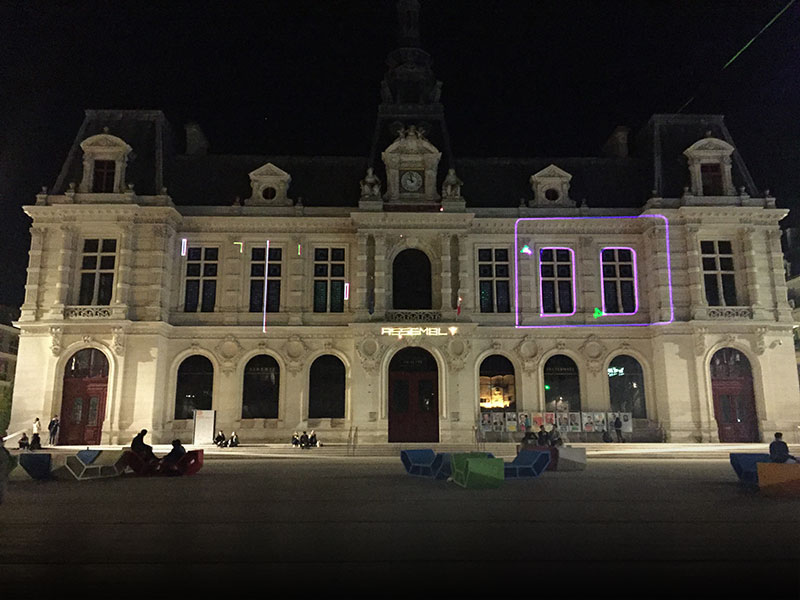
Jouer sur la ville 2017 : l’animation de la mairie de Poitiers avec des jeux lasers recidive. Plus de joueurs, plus de jeux : à coté de laser pong, laser asteroids et laser hexagon, une nouveauté par Kushulain, un space shooter qui utilise les fenetres du batiment.
Organisation de la competition laser lors de la demoparty cookie 2017, le 8-9 decembre 2017 au Jardin d’Alice de Montreuil. Wiki
Nouvelle compilation de codes de familiarisation avec une version jouable mais tres alpha d’une adaptation laser de VipeÜt d’astrofra.
Like no other, the year 2016 pointed out how well „works for me“ works for us.
It does not. Mutual hate, envy, insensibility and exclusion have driven us apart.
Feeling isolated and threatened, we turn further against each other, take less care of each other and worry even more about ourselves. And yet, we are never alone: Excessive surveillance is now politically normalized, if not for all then at least for those who are different, intractable, foreign.
Let’s break this vicious circle.
Let’s get together and live our utopia.
Let’s strive for something that works for all of us.
Avec chaque hiver vient le Chaos Computer Congress, cette année du 27 au 30 décembre.
Bien plus que les autres, l’année 2016 a montré combien « works for me » marche pour nous.
Ca ne marche pas : haine mutuelle, envie, insensibilité et exclusion nous ont déchiré. Les sensations d’Isolement et de menaces nous oppose, nous faisant prendre moins soin de chacun et nous préoccupant plus de nous meme.
Et nous ne sommes toujours pas seuls : la surveillance excessive de tous est maintenant politiquement normalisée, ou au moins des différents, etrangers ou rebelles.
Cassons ce cercle vicieux.
Rassemblons nous et vivons notre utopie.
Battons nous pour quelque chose qui fonctionne pour chacun de nous.
Et combattons celui qui ne nous laisse pas faire !
Le /tmp/lab a été invité le mercredi 21 septembre à l’émission “les nouvelles vagues” sur France Culture, dans le cadre de leur semaine sur l’action. Nous y sommes allé avec un petit camarade du Jack (Hackerspace à Montreuil).
Décerner des bullshit bingo du fond de la grotte c’est bien, mais le hackerwashing, la recuperation, ca suffit, il fallait reprendre le bâton de pèlerin et prendre la parole.
Au final, plus que d’évoquer par l’exemple des actions de chacun, nous avons pu évoquer une vision différente du hacking, loin des sempiternels clichés.
Mais ca n’a pas raté, le premier mail que l’on a recu après l’émission était signé de Cap Digital, ceux la même que l’on denoncait, mais qui ne se sont visiblement pas reconnus et qui nous propose candidement de participer a la grand messe du bullshit : Futur en S.
Des liens :
Le manifeste Hacker : https://framablog.org/2013/01/15/manifeste-du-hacker-aaron-swartz/
Hackerspace le Jack : http://jack.tf
PSES + HSF 2016 : http://pseshsf.org
Esprit hacker es-tu là ? https://www.lagenerale.fr/?p=7665